Pereviz.Net
English
Sign in
100 parcels free for every new company

Parcels, trips and runs on one phone

Pereviz.Net is a working app for private drivers and courier companies that carry parcels between countries. Customers place requests themselves through your link, while you gather addresses into a run with stops, know where every parcel is, create Nova Poshta waybills and keep count of trip expenses.

  • No subscription fee
  • Sign in with Google
  • No app store install
  • Phone and computer
  • Interface: English, Українська
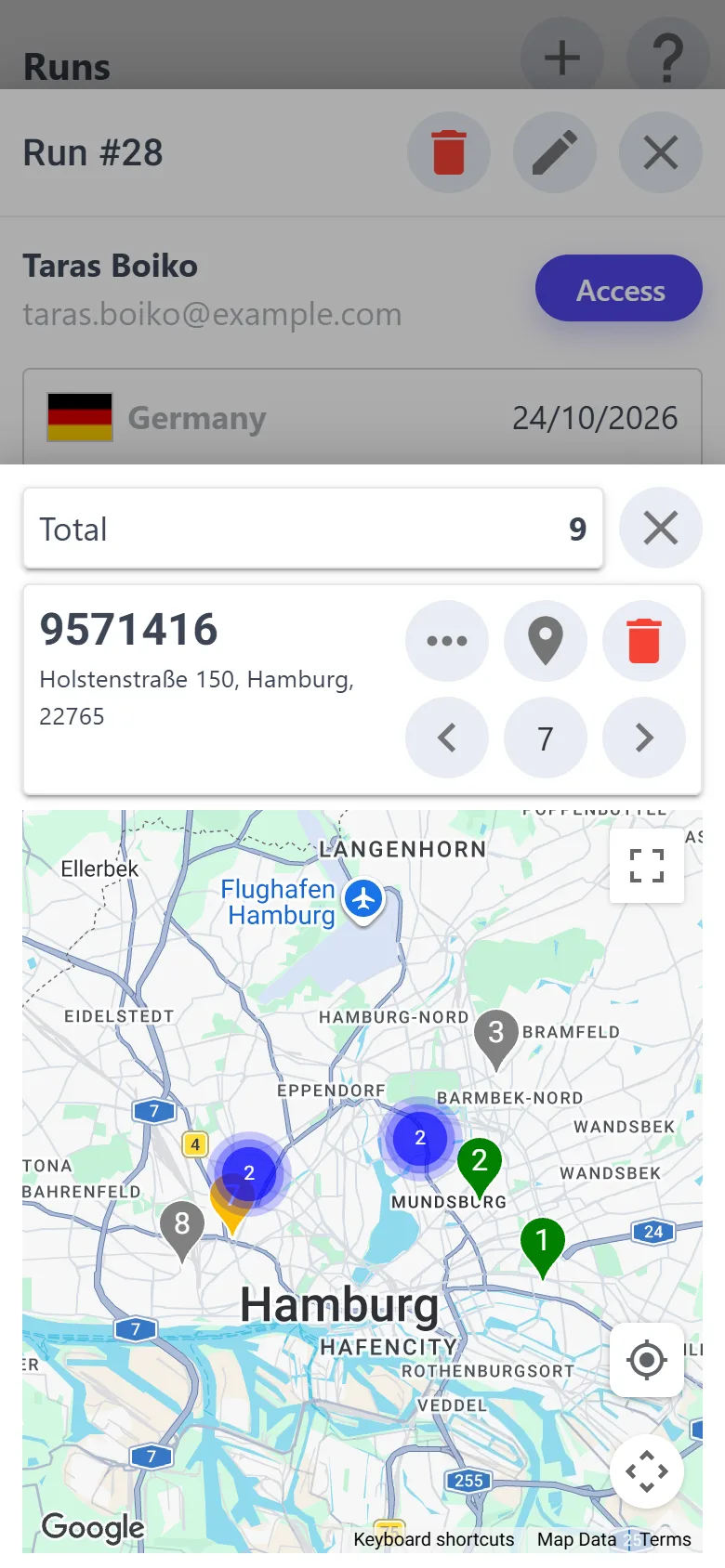
Run map with stop numbers
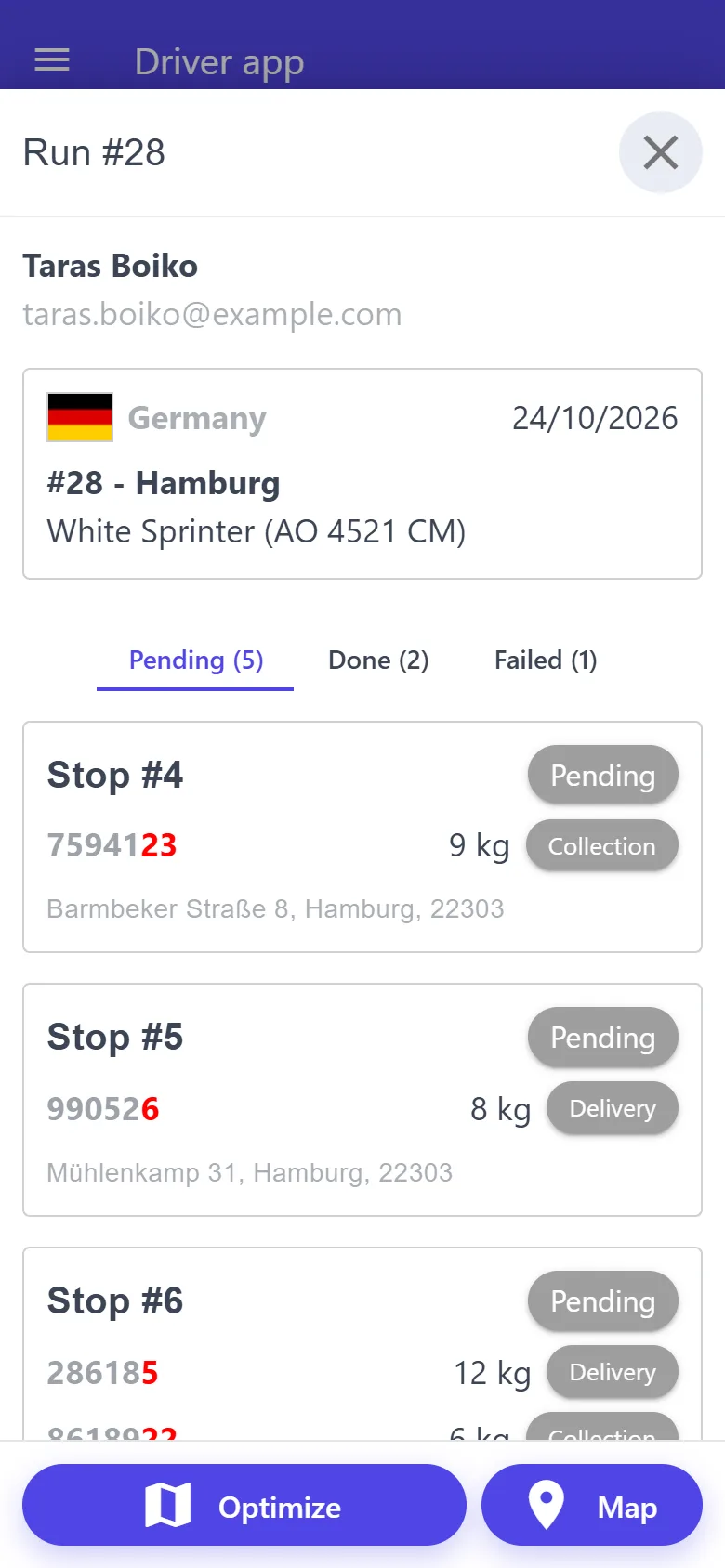
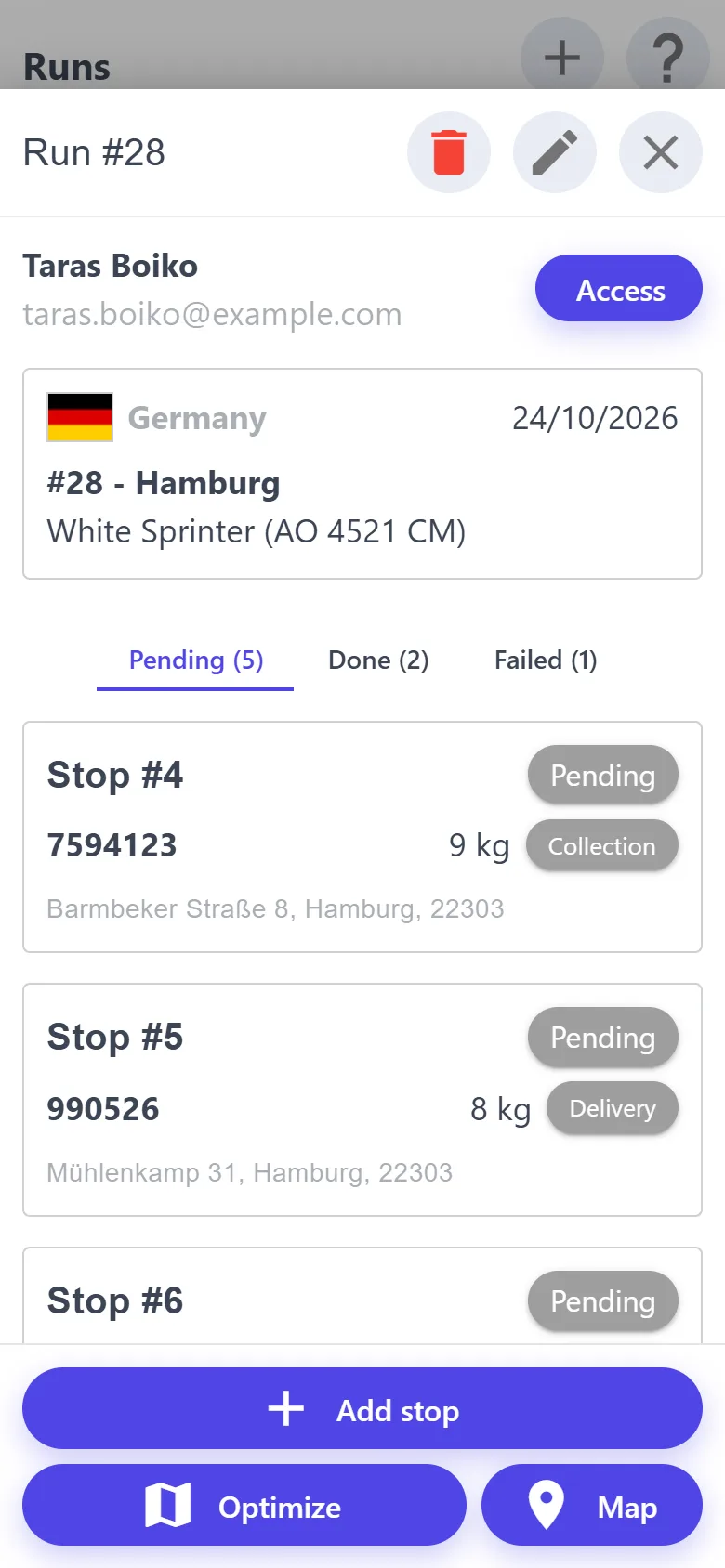
A run: stops by status “Pending”, “Done”, “Failed”
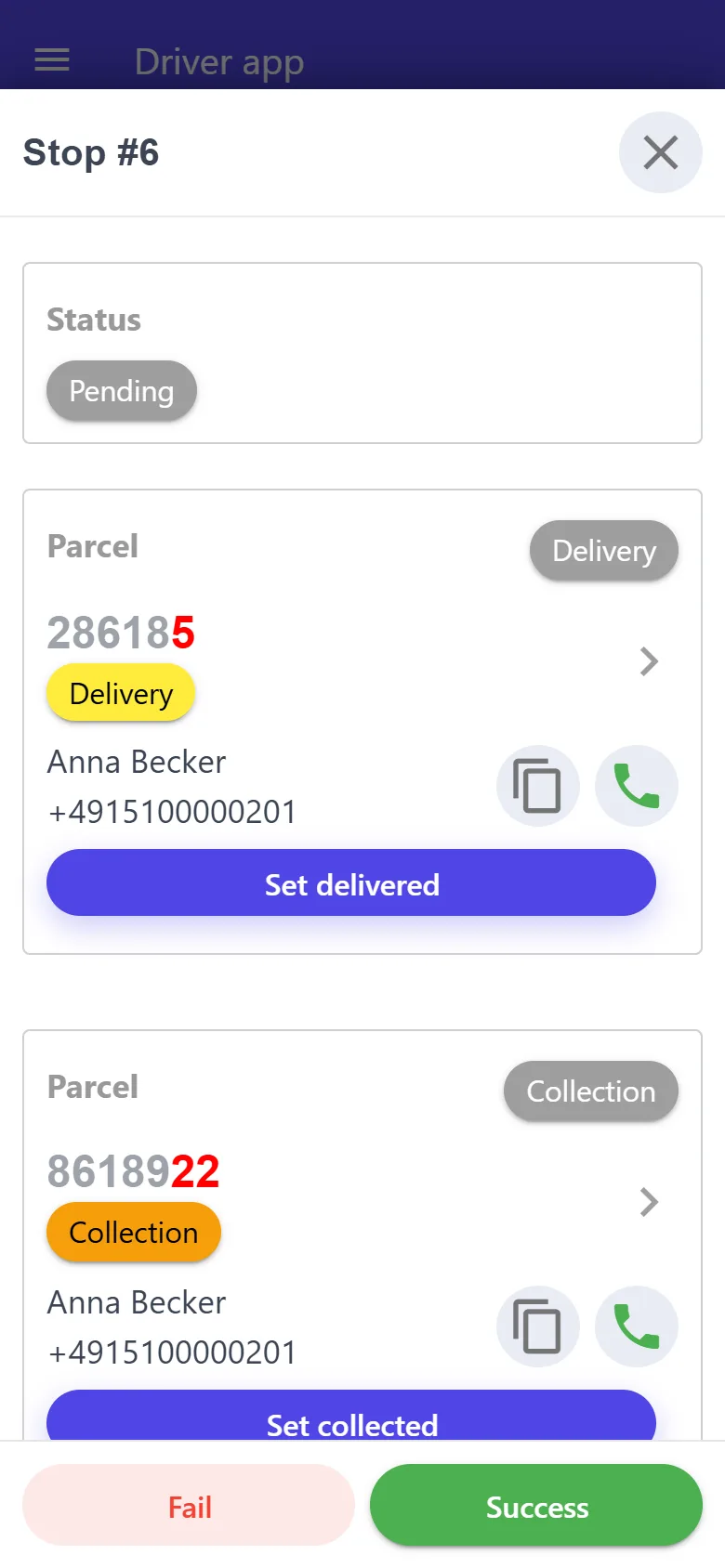
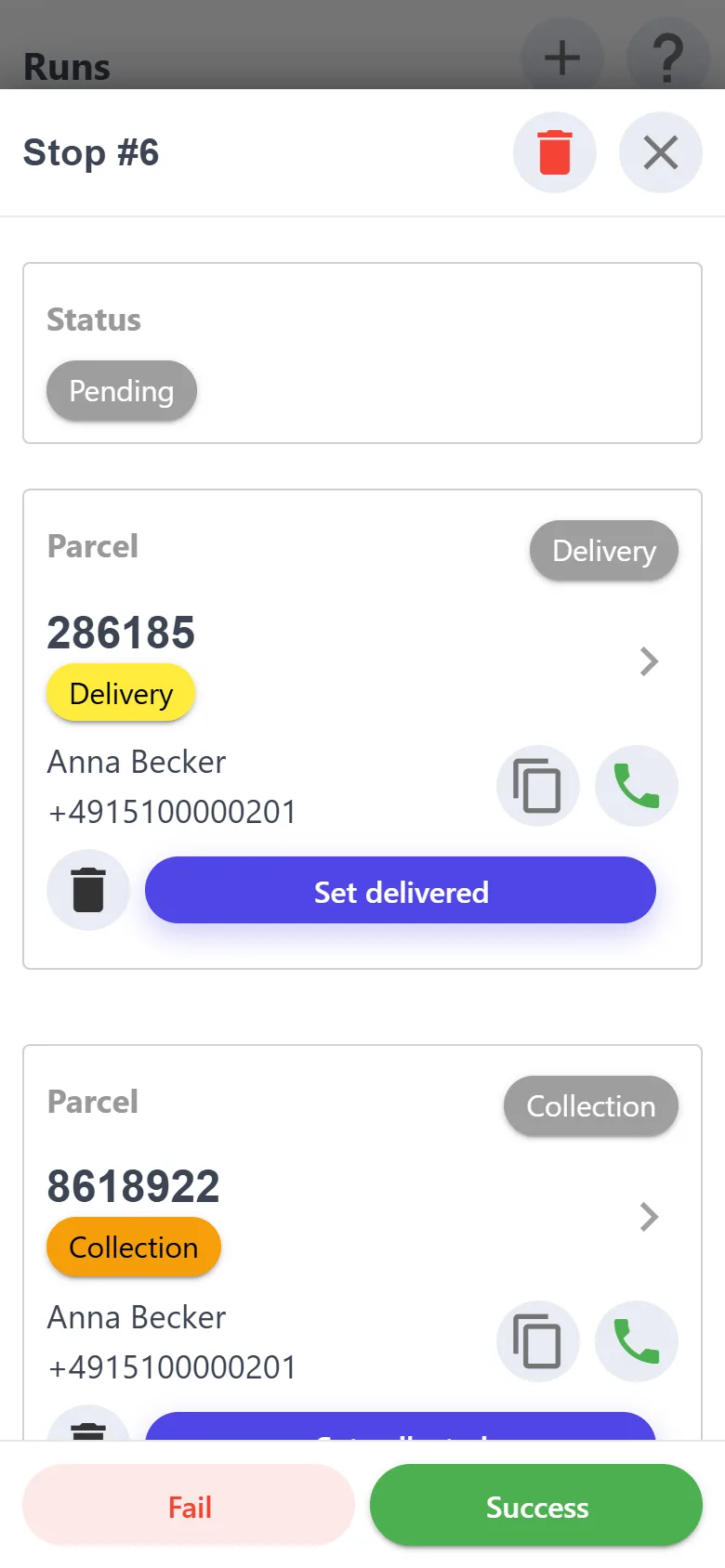
Delivery and collection at one address
New requestMukachevo → Hamburg
Run optimized8 stops in order
No signalChanges saved on the phone
Waybill createdNova Poshta
100parcels free for every new company
0subscription fee — you pay only for parcels in work
500active parcels always on the phone — even without a signal
20upcoming runs open offline
Instead of a notebook

A notebook gets lost. The app doesn't.

Addresses in a notebook, requests in messengers, receipts in the glovebox — that works while parcels are few. Pereviz.Net keeps everything in one place and takes the manual work away.

Before

  • Addresses and phone numbers in a notebook, requests in calls, Viber and Telegram
  • Address order by guesswork, with extra kilometers
  • Whose box is where — which van, which warehouse — means calling around to ask
  • Fuel and toll receipts get lost, trip expenses are added up on a calculator at the end
  • Nova Poshta waybills by hand, one at a time

After

  • The customer places a request through your link, you approve it with one tap
  • A run with stops in order from start to finish, numbered on the map
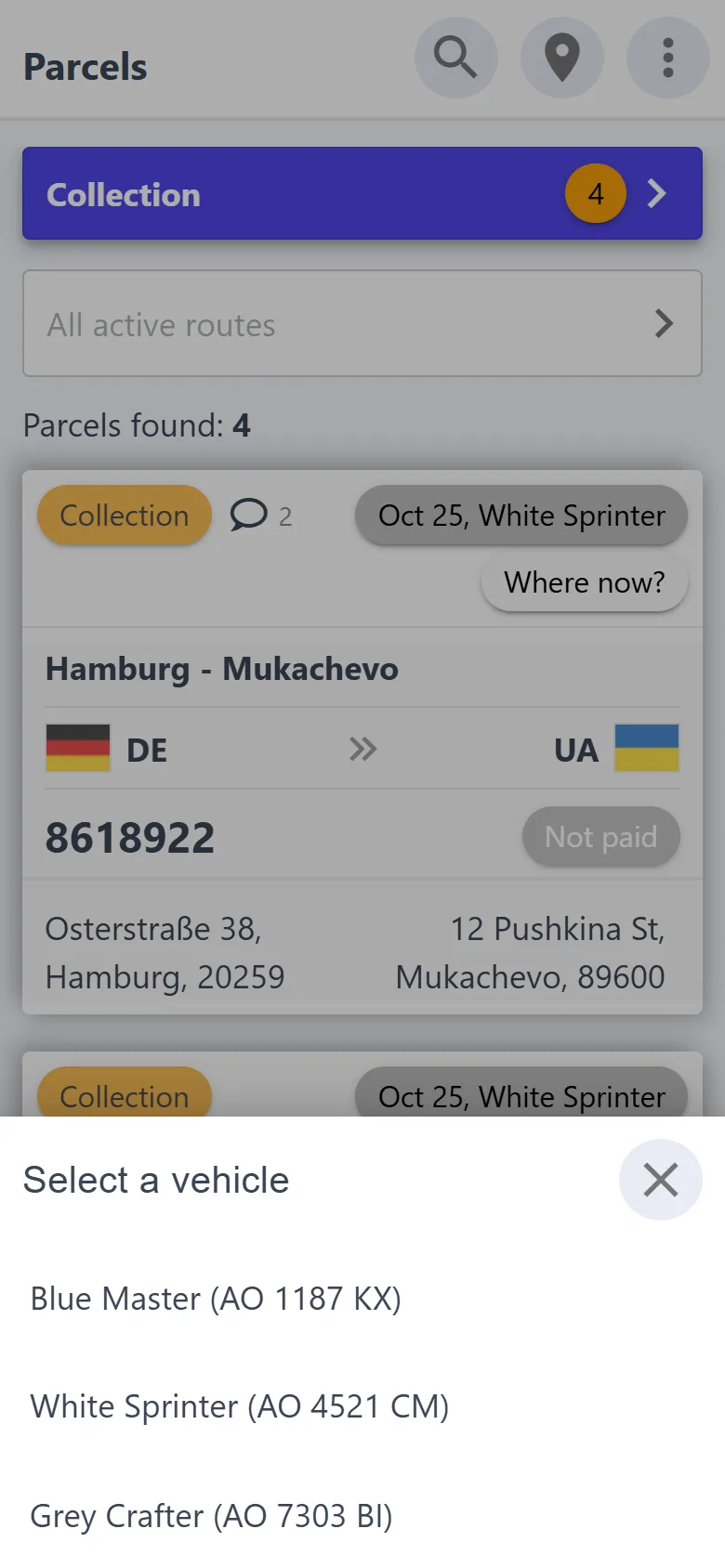
  • The parcel card shows the trip and “Where now?”: a vehicle or a warehouse
  • Expenses with a receipt photo go straight into the trip, the total in each currency adds up by itself
  • The waybill is created when the parcel is saved
Benefits

Nine reasons to close the notebook

The essentials in short. What it looks like on screen is below.

Requests without calls or chats

The customer places the parcel through your link: an address with a point on the map, a phone, the weight and a description. All you do is tap “Approve” and pick a trip right away. Your phone and Telegram tell you about every new request.

A run built in a few taps

“Add stop” shows only the parcels this very run can take: the right country, the right vehicle, no other active run. Add them from the list or select them on the map.

One address — one stop

Several parcels at one address become one stop — collection and delivery together. “Optimize” puts the stops in order from start to finish, and their numbers show on the map.

Every stop under control

“Pending”, “Done”, “Failed” — with counters and times. A stop can't be failed without a reason, and the stop's note shows right in the list. Calling and navigating take one tap.

You know where every parcel is

Which vehicle or warehouse it is in, and which trip it travels on. The “Vehicle” filter shows everything in the van right now, and “Not assigned to active run” shows what is not planned yet.

Trip expenses with receipts

Fuel, food, repairs, tolls: the amount in hryvnias, euros, dollars or pounds and a photo of the receipt. The trip total in each currency adds up by itself.

Nova Poshta without retyping

A waybill for collection or delivery is created when the parcel is saved — on behalf of your business account, to the right branch.

Works offline

On the highway, at the border, in a basement: collection, delivery, payment and photos are saved on the phone and sent by themselves as soon as the network is back.

Drivers get their own app, you get a journal

A driver signs in with Google to a simple app: their trips and runs, stop updates, expenses, collection and delivery. And the journal shows who changed what, and when.

Features

From request to delivery — in one app

Made for the phone first: add the app to your home screen and it opens like a regular app, no app store needed. And at the office the same account opens on a computer.

A run in a few taps

A run is a round of addresses in one country, in one day, in one vehicle. The app picks the parcels that suit it, groups them by address and puts the stops in order.

  • “Add stop” — only parcels of the right country and vehicle that are in no other active run
  • From the list or on the map: tap a marker and ✓, or circle them with a finger
  • Parcels at one address make one stop: collection and delivery together
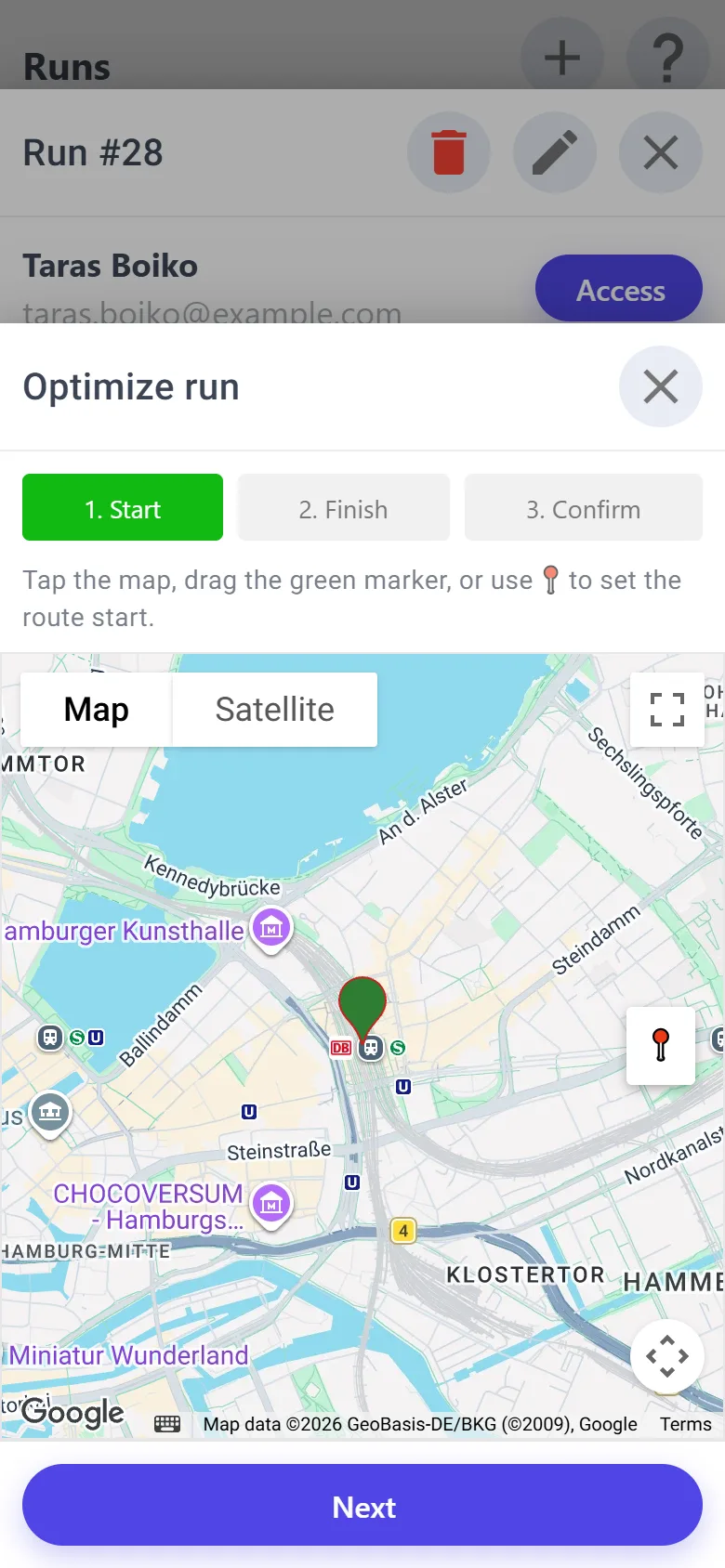
  • “Optimize”: a start and a finish — and the stops line up in order
  • “Map” — numbered stops and your location; the order can be changed

At random — the van zigzags across town

Optimized — the same stops, a shorter way
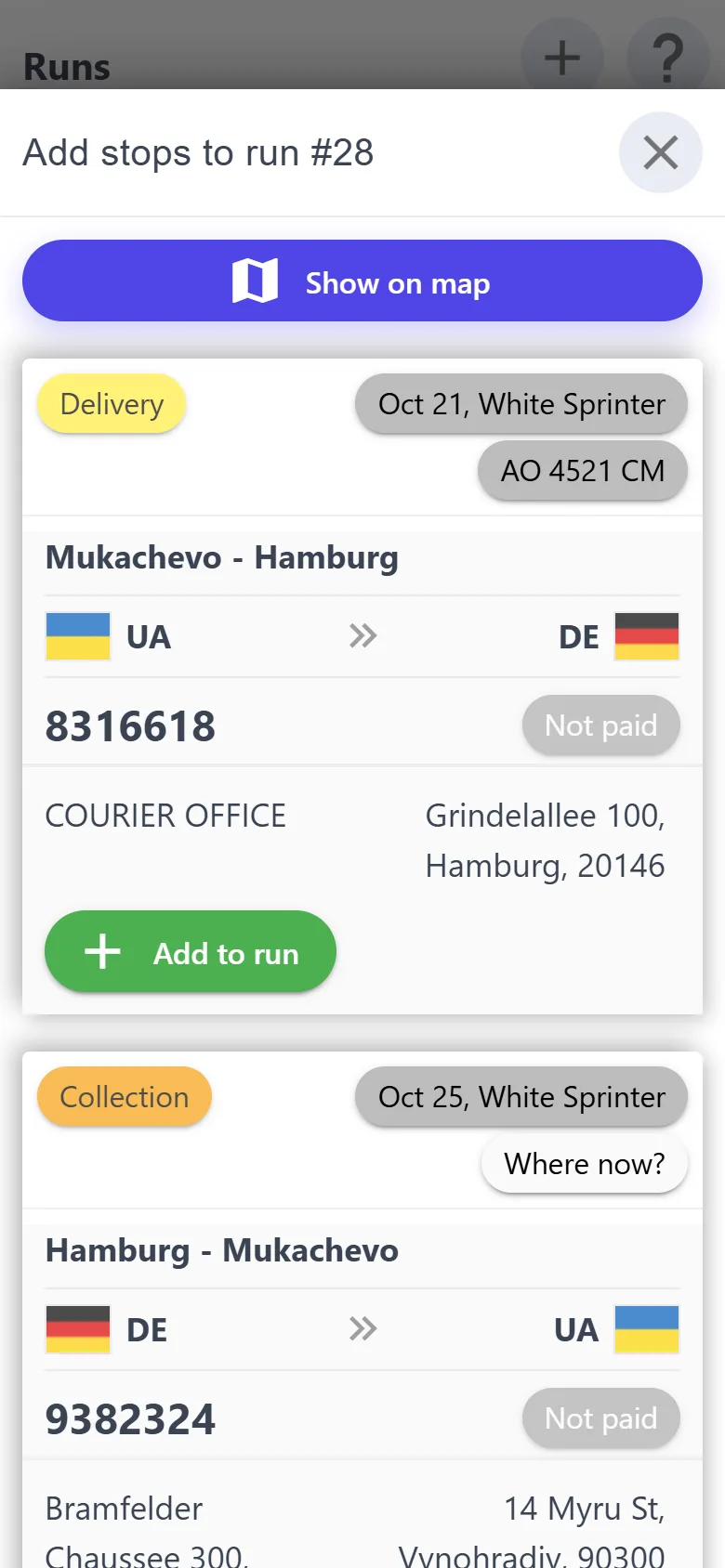
Parcels that suit the run
Optimizing a run: start and finish

Every stop under control

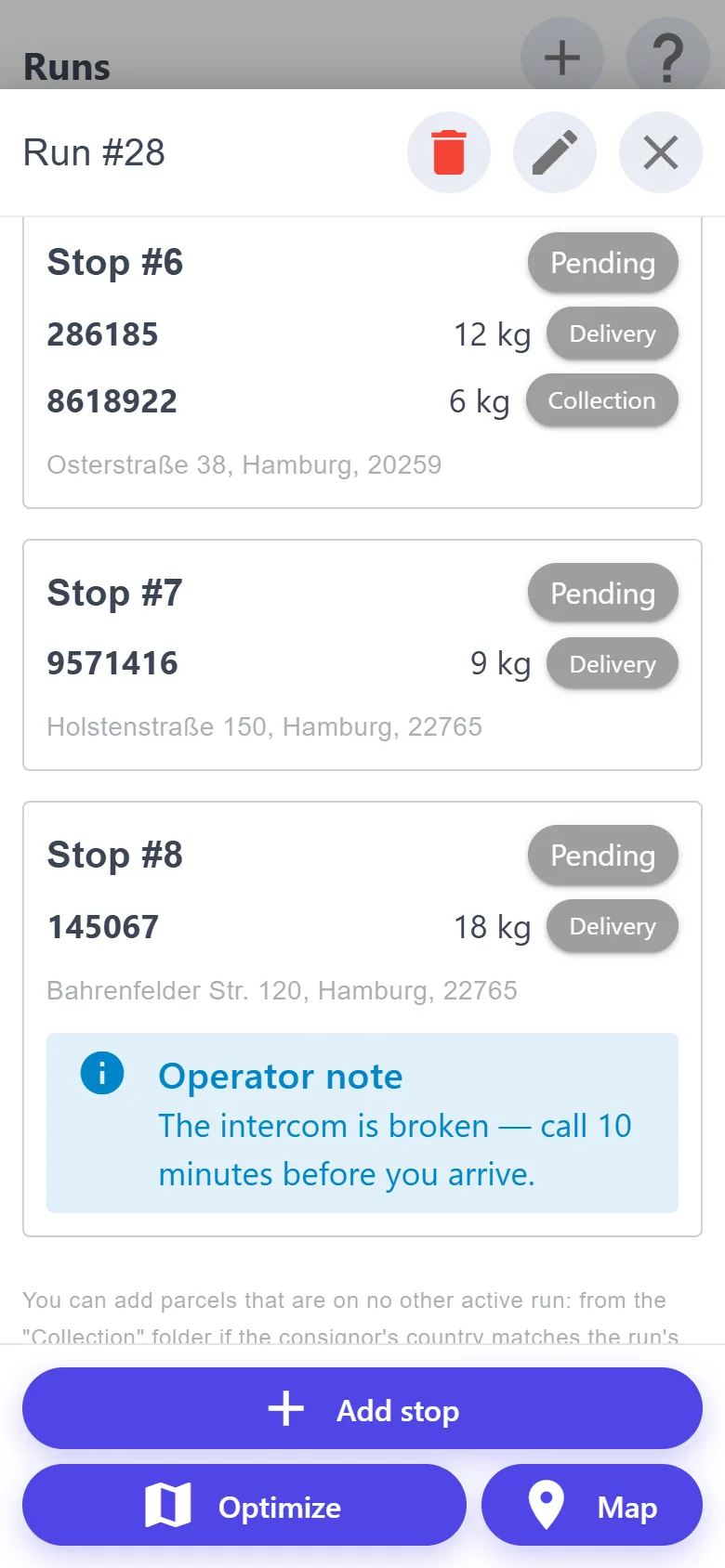
Everything about one address on one screen: what to hand over, what to pick up, whom to call, how to get there. And the run shows how many stops are waiting, how many are done and where it didn't work out.

  • “Pending”, “Done” and “Failed” tabs with counters and the time of the status change
  • “Set delivered” or “Set collected” for every parcel of the stop
  • A call and navigation in Google Maps — one tap
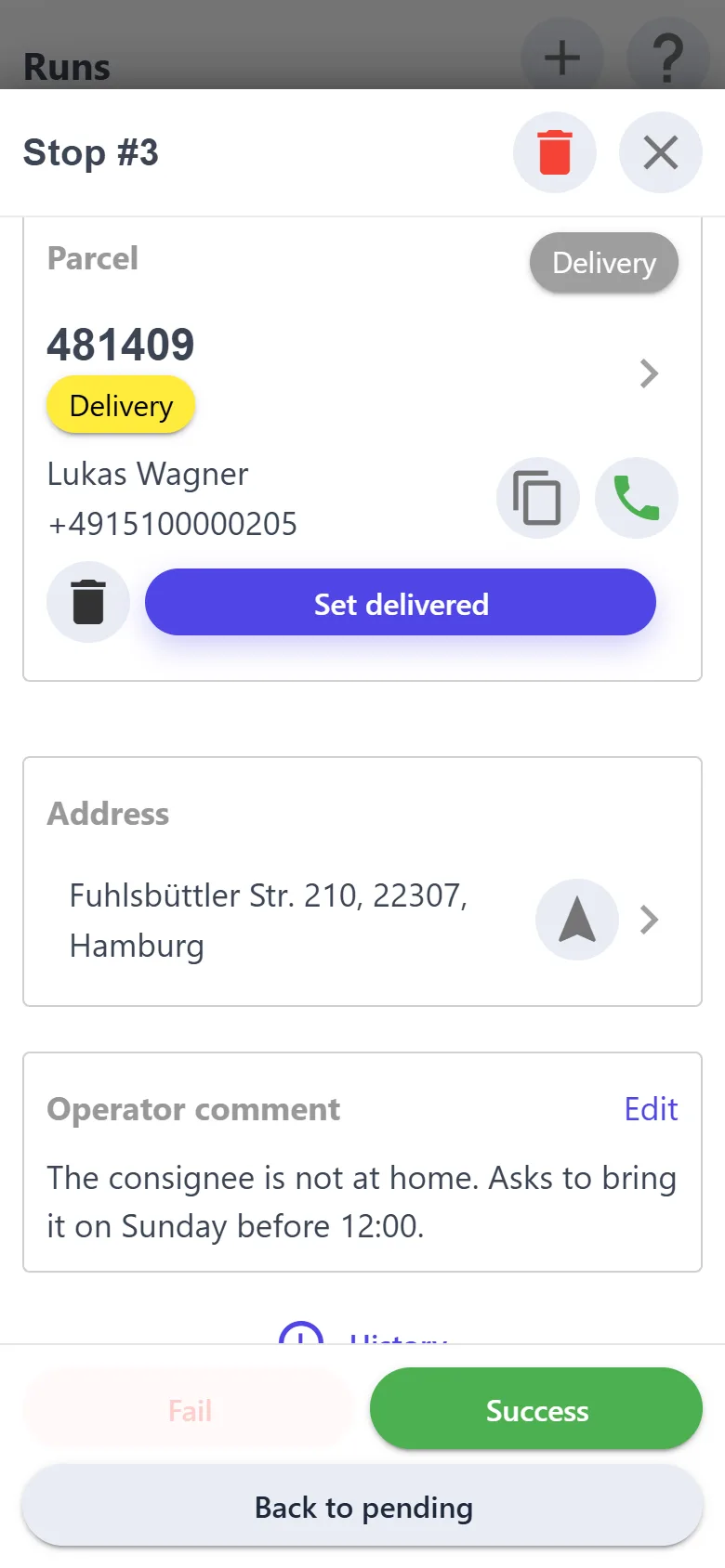
  • “Failed” only with a reason, and the stop's comment shows right in the run list
  • The driver updates stops in their own app — you see the status at once
A shared address and a stop note
A failed stop with a reason

You know where every parcel is

Which van or warehouse it is in and which trip it travels on — right on the card. No leafing through a notebook or calling the driver to remember whose box is where.

  • New
  • Collection
  • Delivery
  • Delivered
  • The card shows the trip (date and vehicle) and “Where now?”: a vehicle or a warehouse
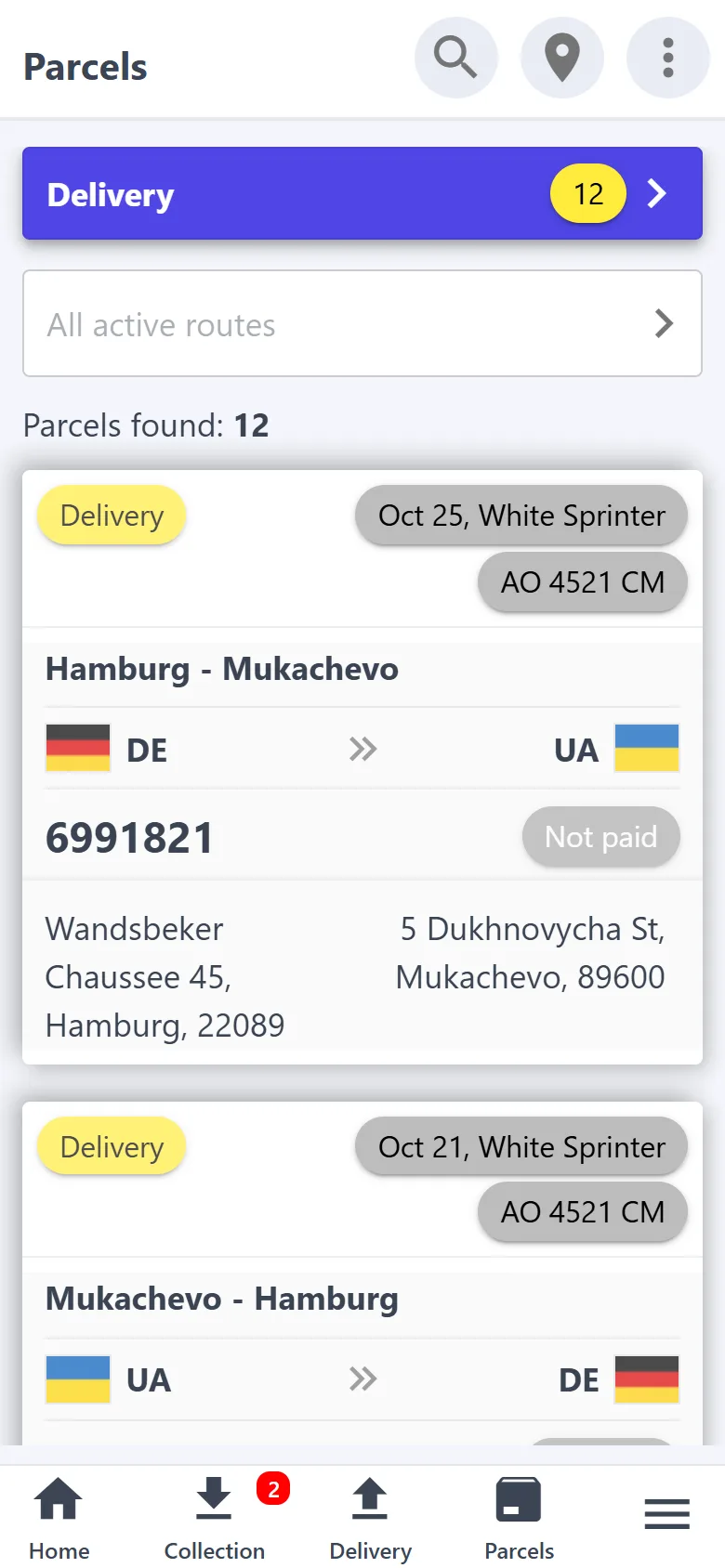
  • The “Vehicle” filter — everything in the van now; “Not assigned to active run” — what is not planned yet
  • A run won't offer to collect a parcel that is already in another van
  • Status folders, search by tracking number, name, phone or address, QR and barcode scanning
Trip and place on the parcel card
Where the parcel is now: choosing a vehicle

Trip expenses with receipts

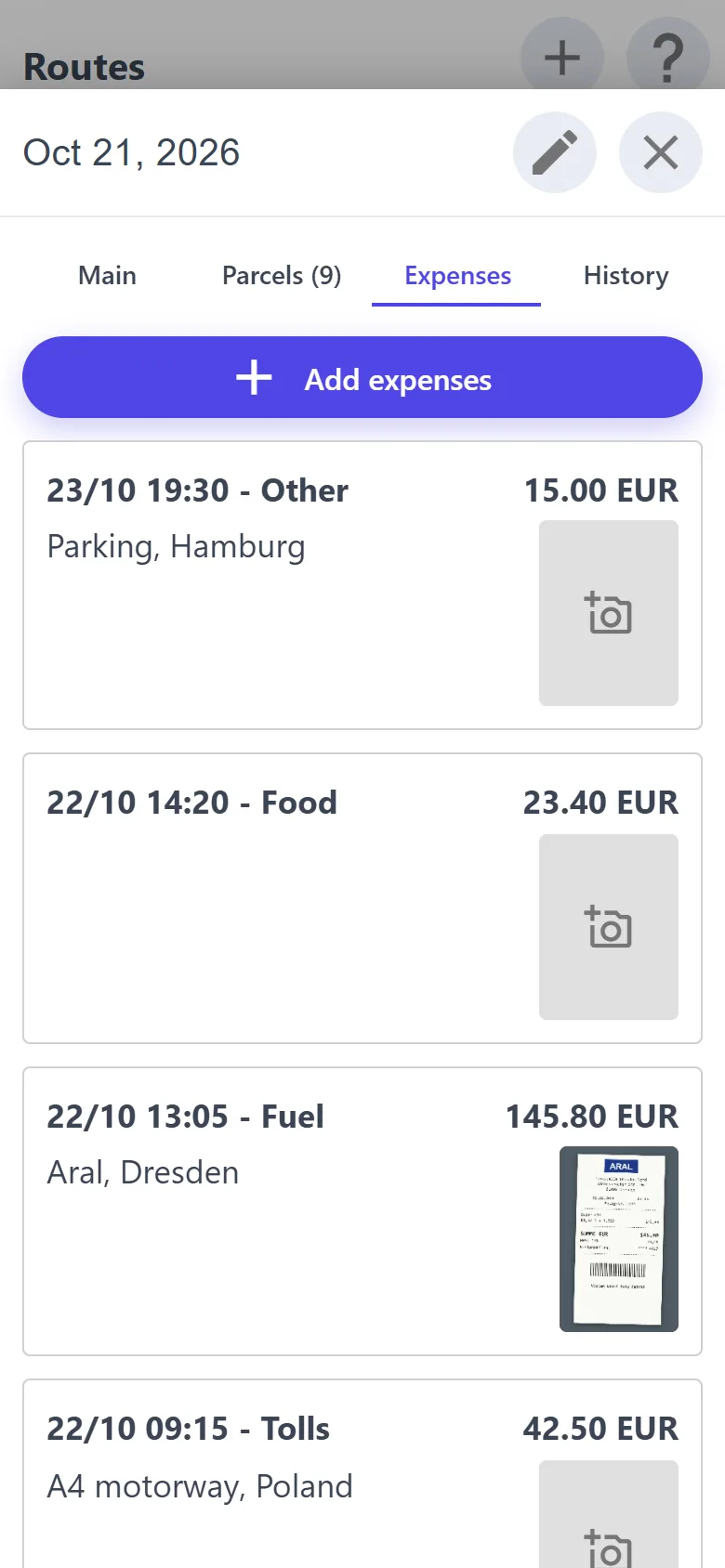
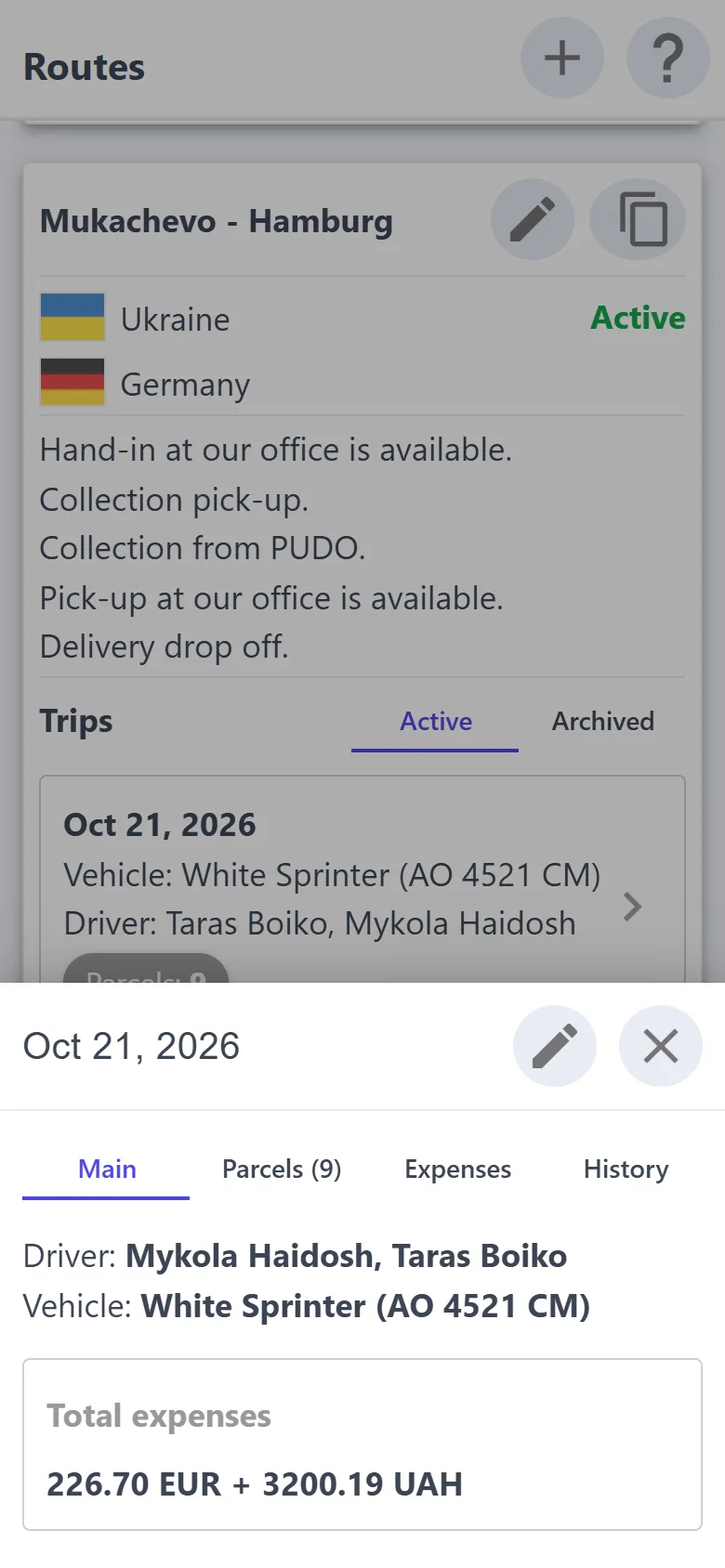
A trip brings together the vehicle, the drivers, the parcels and the expenses on the road. The fuel receipt is photographed on the spot — and it is in the trip, not in the glovebox.

  • Fuel, food, repairs, tolls or anything else — with a date and a comment
  • The amount in hryvnias, euros, dollars or pounds; the last currency is filled in for you
  • The trip total in each currency adds up by itself
  • Drivers enter expenses themselves — in the driver app
Trip expenses with receipt photos
Trip: drivers, vehicle, expenses

Nova Poshta without retyping

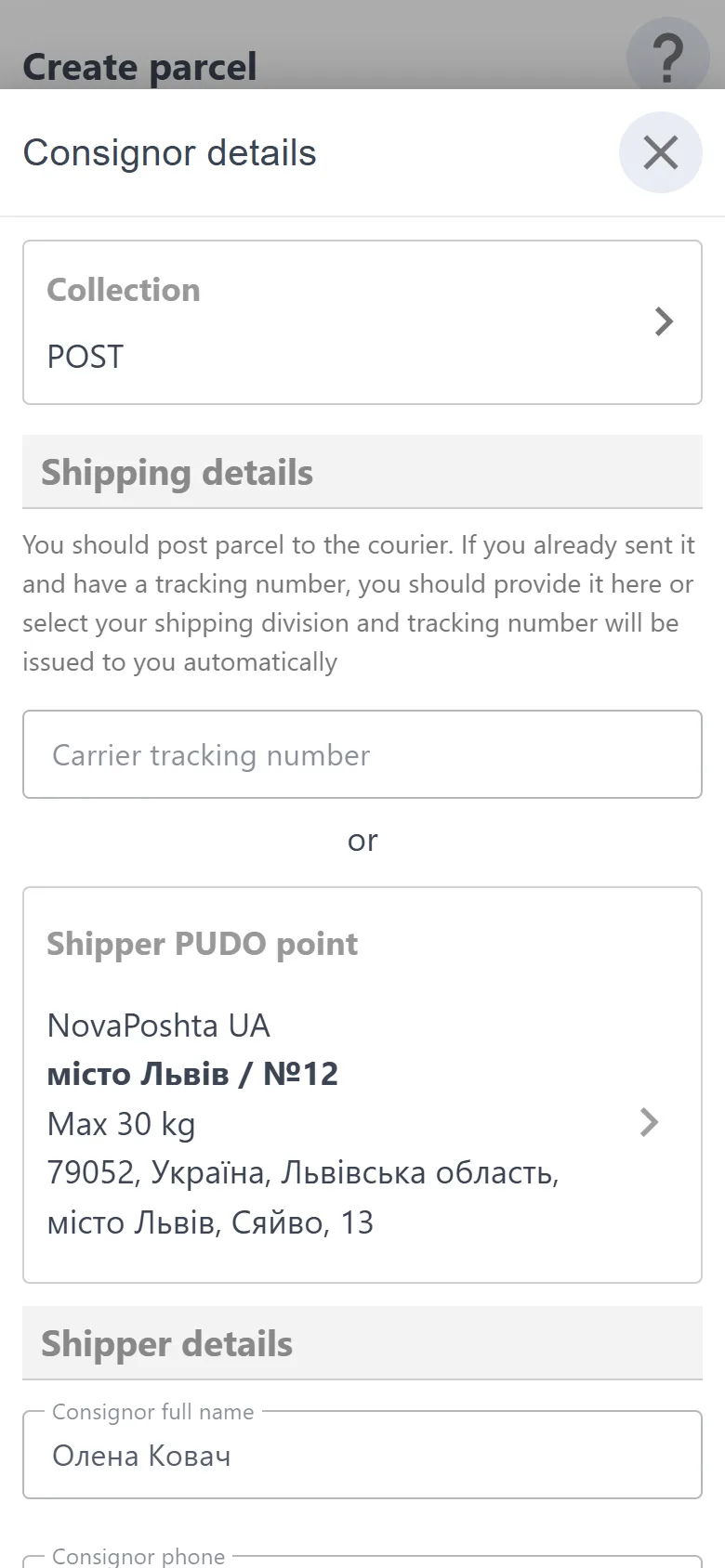
Enter your Nova Poshta API key — and the waybill for collection or delivery is created when the parcel is saved: on behalf of your business account, to the right branch. No copying addresses into the business account.

  • The customer drops the parcel off at a branch, and you pick it up from there
  • The consignee picks the parcel up at their branch
  • Collection and delivery waybills are on the parcel card: create again or download
  • Parcels by post sit in separate “Collection (PUDO)” and “Delivery (PUDO)” folders
Consignor through a Nova Poshta branch

Works offline

On the highway, at the border, in a basement: collection, delivery, payment and photos are saved on the phone and sent by themselves as soon as the network is back. Work doesn't stop.

  • Up to 500 active parcels and the 20 upcoming runs — always on the phone
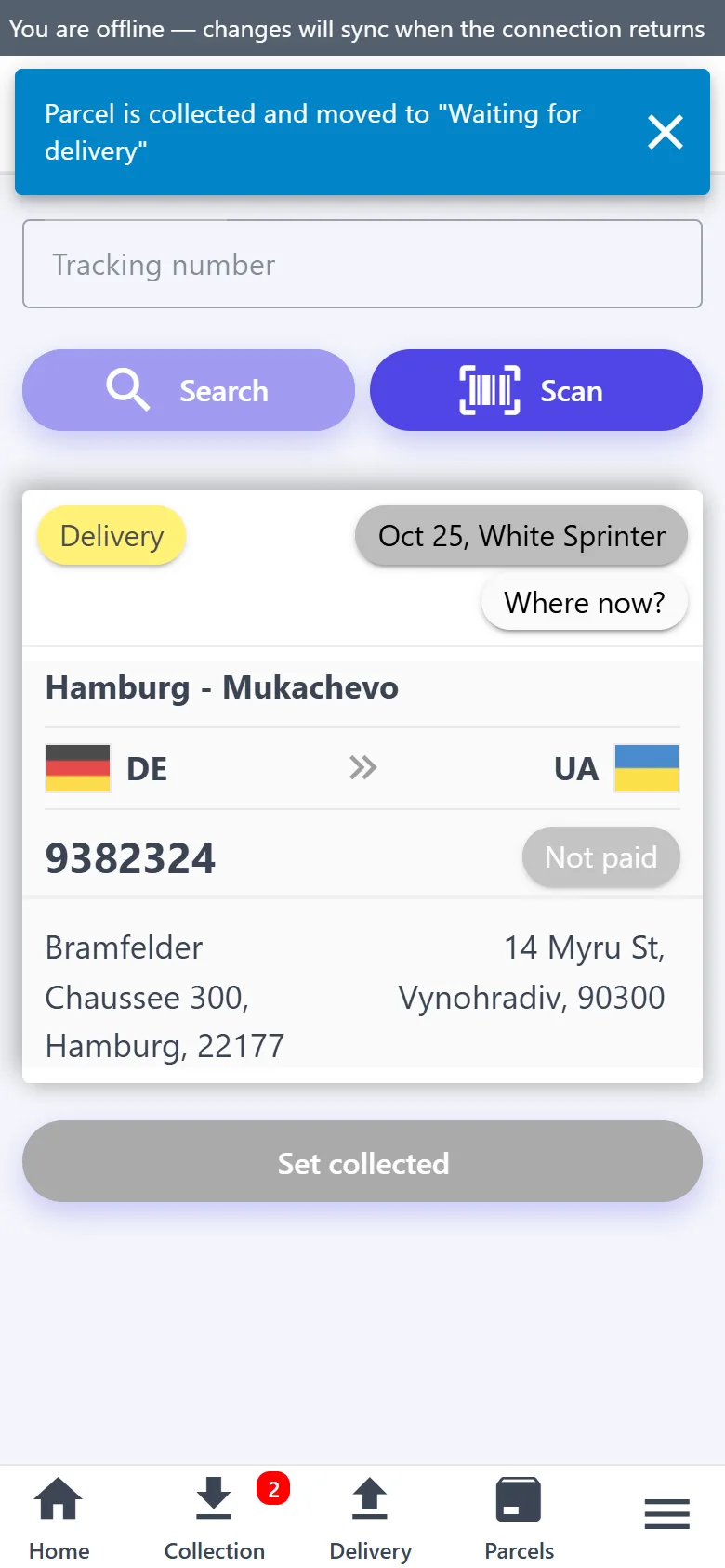
  • Offline: “Set collected”, “Set delivered”, payment, the collected amount and photos
  • Runs, stops and addresses open from the copy on the phone; stop marks wait for the network
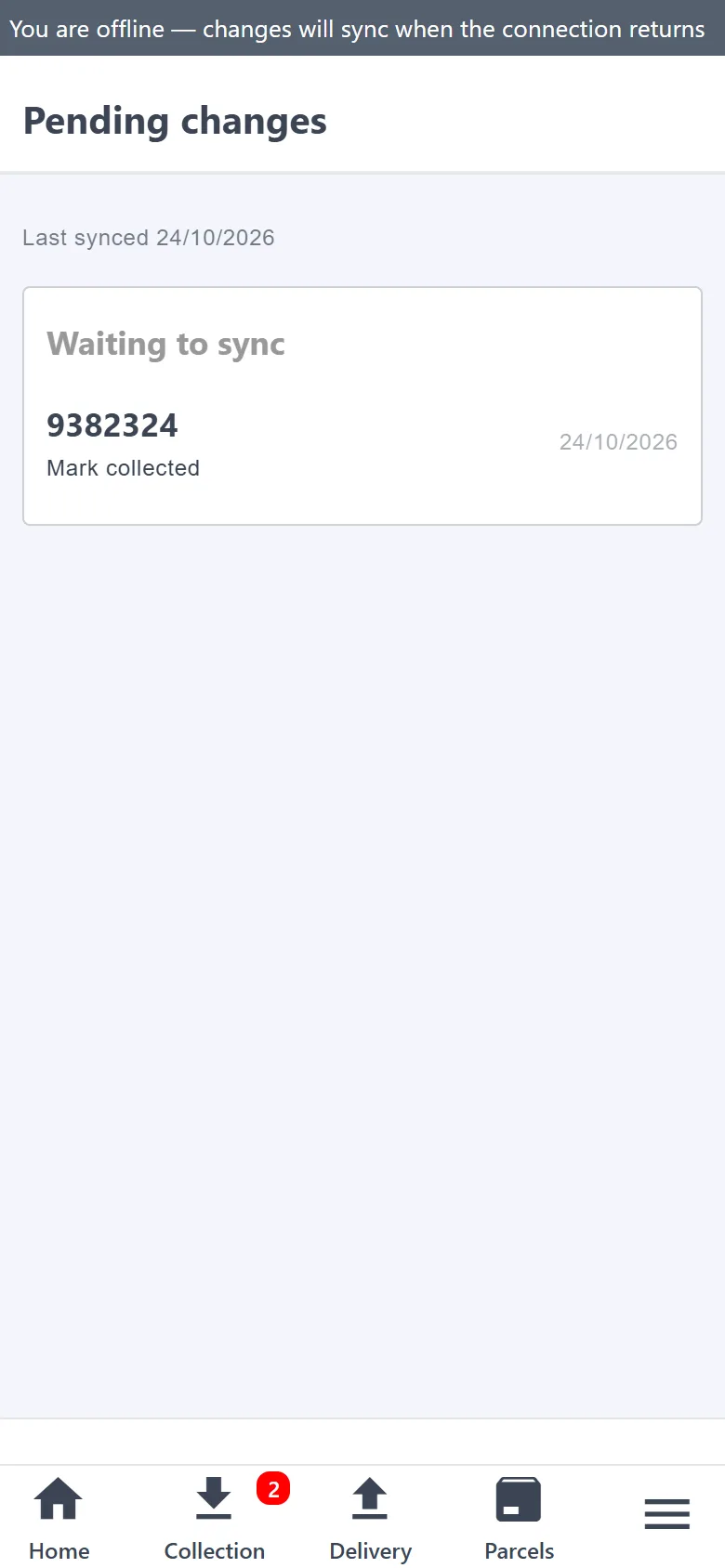
  • Changes are sent by themselves, and if the parcel was changed on the server meanwhile, the app warns you
Collecting a parcel offline
Changes waiting for the network

A journal: who changed what, and when

A dispute is easy to sort out: every change to a parcel, run, trip or the settings is recorded — even one made offline.

  • “History” on a parcel, run, stop or trip: who changed what — “field: was → now”
  • From which app: the courier's, the driver's or the customer's, the Telegram bot or the scheduler
  • An offline action shows the device time
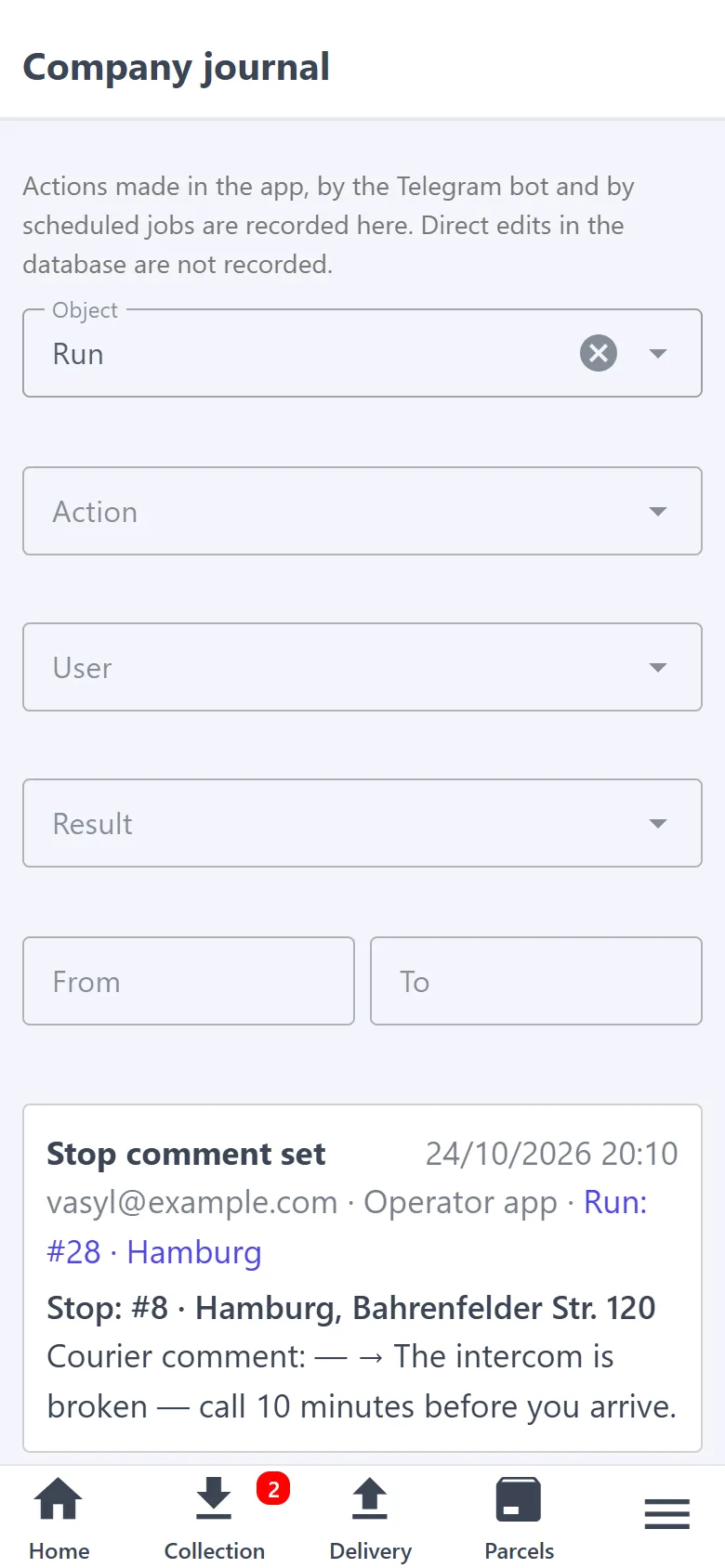
  • The “Company journal” filters by object, action, user and date; entries are kept for 180 days
Company journal

At the office — on a computer

Sorting out requests, planning trips and checking expenses is easier on a big screen. The desktop version is the same account and the same data, just as full-screen tables. The phone stays for the road.

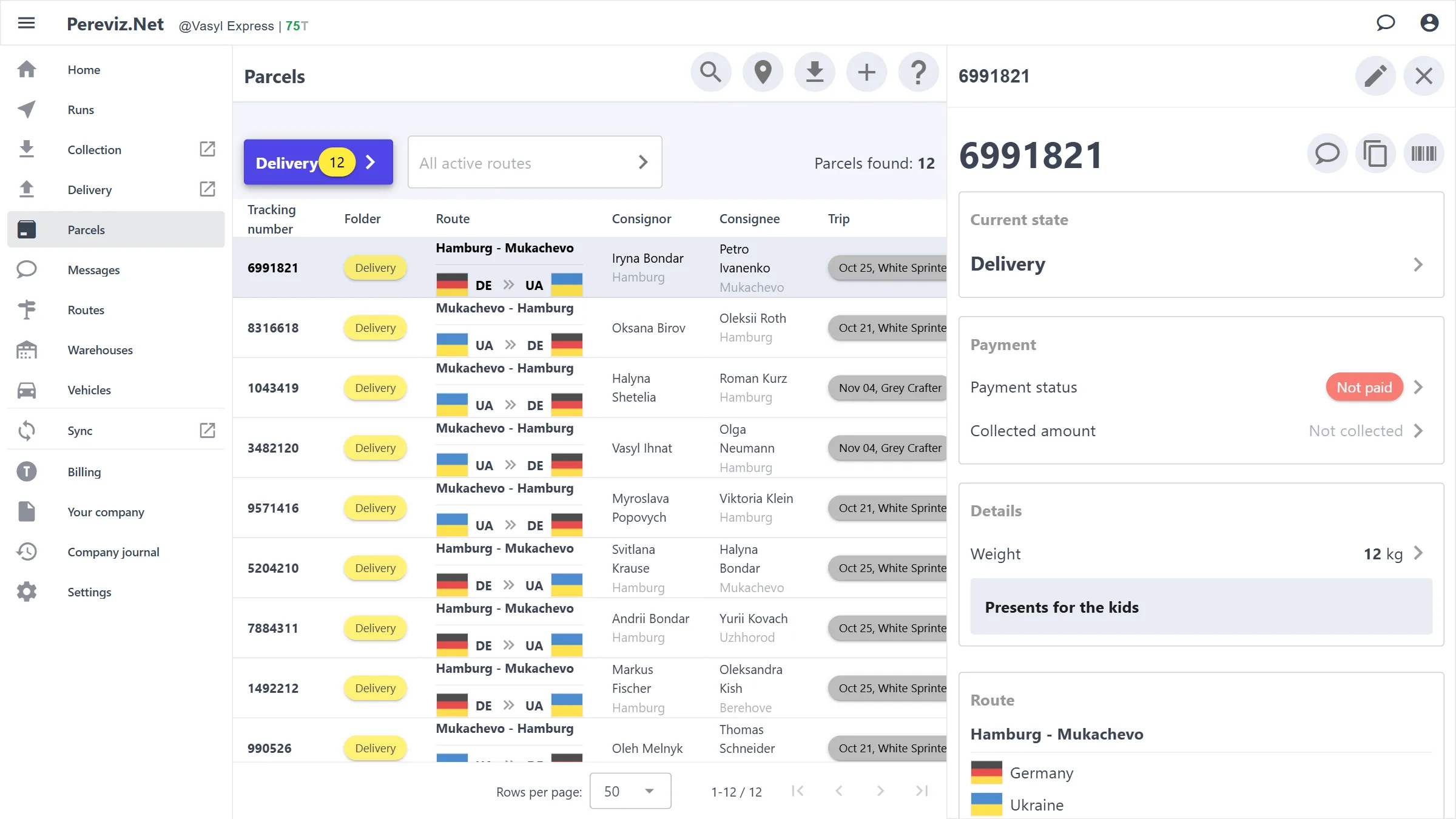
  • Parcels in a sortable table: route, consignor, consignee, trip, location, weight, payment
  • The parcel card opens next to the table; a new request can be approved or declined right there
  • Runs, routes with trips, vehicles and users are tables too, and the menu is always on the left
  • Nothing to install: “Desktop version” in the phone menu, or pereviz.net/desktop
pereviz.net/desktop
Desktop version: the parcel table and the parcel card next to it
The same parcels on the phone
Driver app

Drivers get their own app, with nothing extra

A driver opens pereviz.net/driver and signs in with Google using the email you added them with. They see only the trips and runs you ticked them on — no company settings, billing, customer chats or other drivers' trips.

The run is on the driver's phone

You plan the run and tick the driver — the run shows up in their app. The driver goes through the stops in order and updates each one, and you see the status at once.

  • Stops by status — “Pending”, “Done”, “Failed” — with counters
  • “Set delivered” or “Set collected”, calling and navigation — one tap each
  • “Success”, or “Fail” with a reason; the operator sees the “Driver comment” too
  • “Optimize” and the numbered “Map”: the driver can change the stop order themselves
A run in the driver app
A stop: delivery and collection at one address

Trips, expenses, collection and delivery

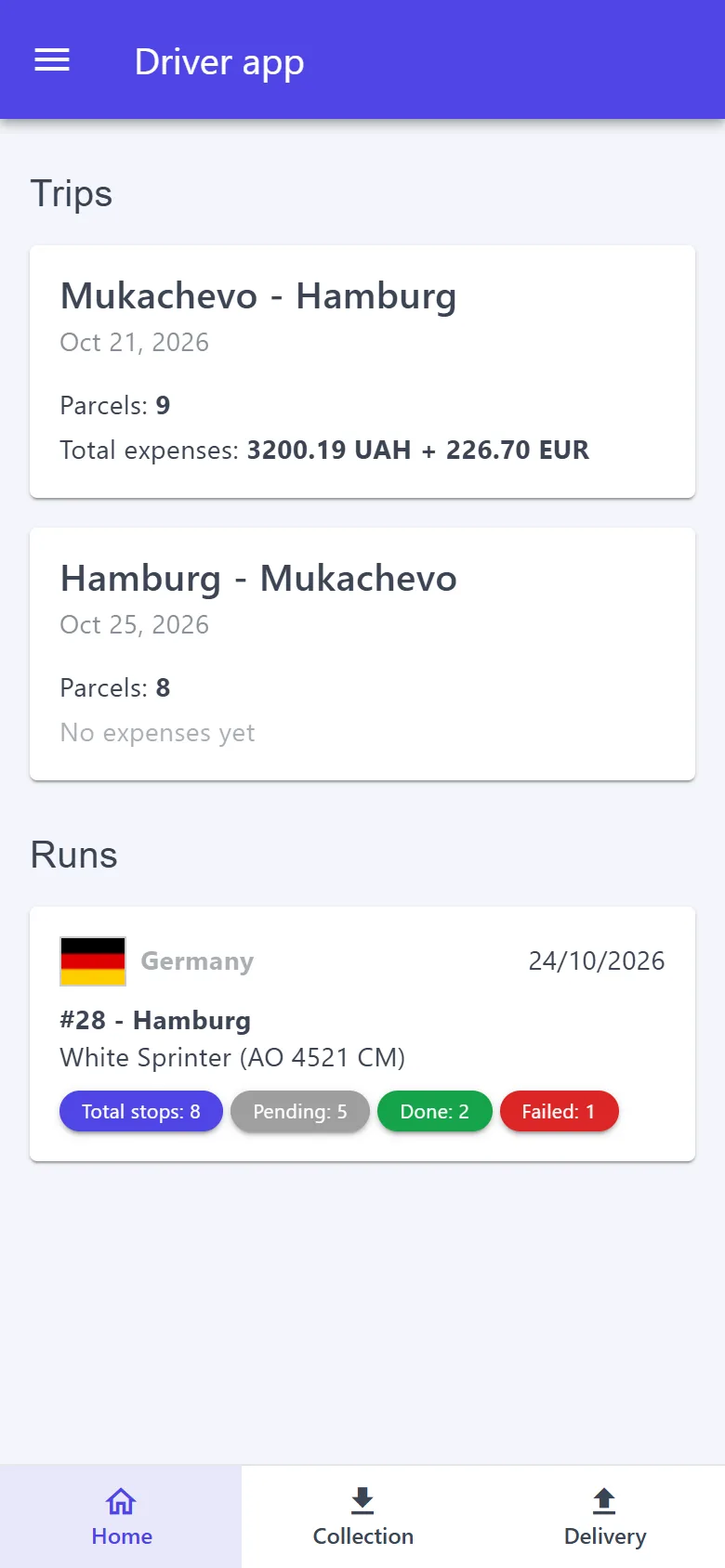
“Home” holds the driver's trips and runs. They photograph the fuel receipt straight into the trip, create a parcel on the spot themselves, and mark it delivered when handing it over.

  • A trip: its parcels and expenses with receipt photos, a total per currency
  • “Collection”: create a parcel on the spot, or find one by tracking number or QR — then “Set collected”
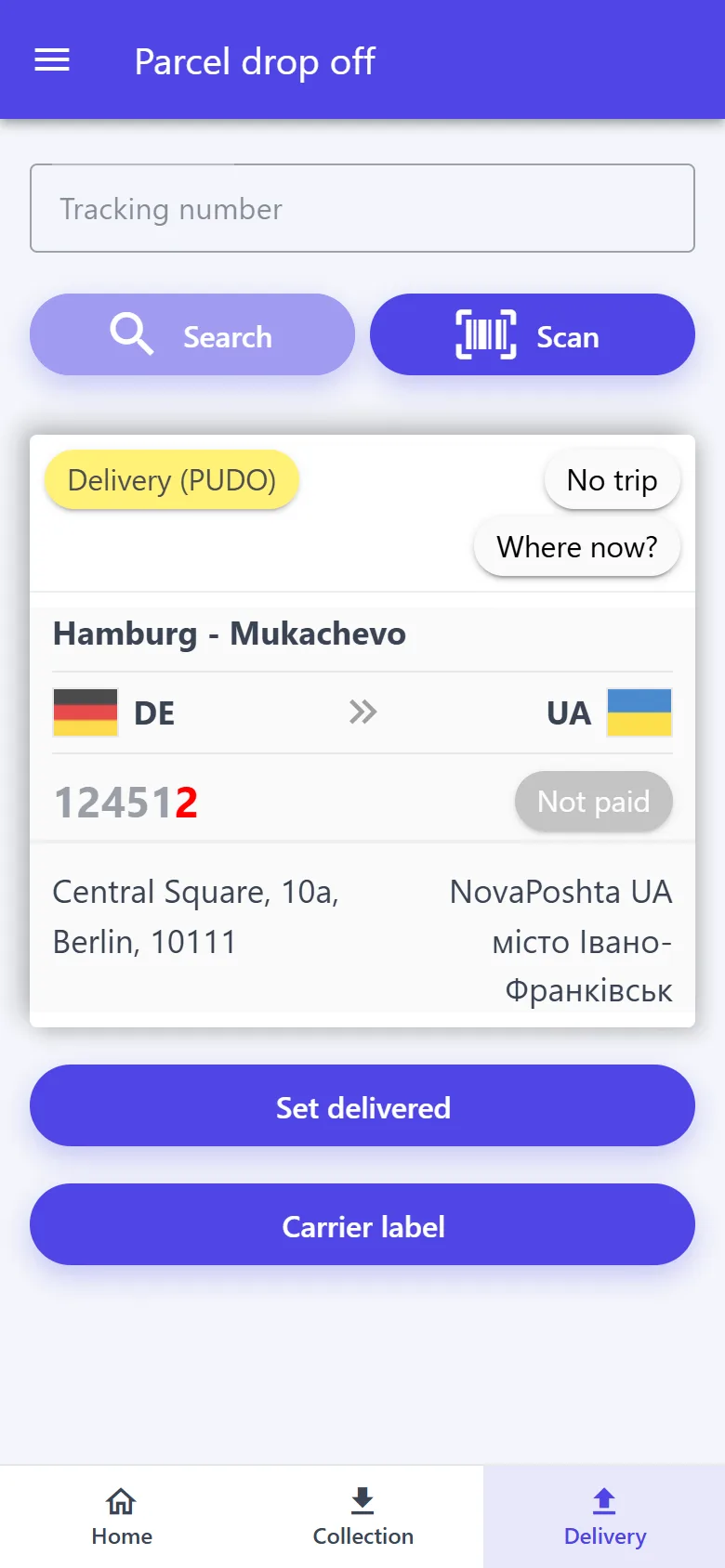
  • “Delivery”: “Set delivered”; for a Nova Poshta branch — the carrier label
  • Installs on the home screen without an app store; works online
The driver's trips and runs
Delivery with the carrier label
And more

Small things that save hours

Routes and trips

Permanent “country → country” directions and trips on specific dates. Customers see only active routes.

Chat on the parcel card

Messages belong to the parcel instead of being scattered across messengers. Both the consignor and the consignee see the reply.

Notifications

A new parcel or a customer message — as a notification on the phone. New parcels also come to the Telegram bot.

QR labels

Your own label with a QR code and a short code for every parcel: share it or download it.

Excel

Found parcels in a single file: for reports or the accountant.

In-app support

The “?” icon on every screen — a question or feedback, with the current page attached automatically.

Getting started

Four steps to your first request

  1. 1

    Sign in with Google

    “Create new company”: a name and a short name for the link. 100 parcels on the balance right away.

  2. 2

    Add a vehicle, a route and a trip

    The red “Required steps” bar shows what is missing and takes you to the right screen.

  3. 3

    Share the link

    Copy it on “Home” and send it to customers — requests will start coming in by themselves.

  4. 4

    Add drivers

    “Your company” → “Users”, then “Access” on the trip and the run: a driver signs in to the driver app with their own Google account and sees only their own work.

Pricing

No subscription fee: pay only for parcels in work

100 parcels free for every new company Get 100 parcels
  • 100A 100 T bonus is credited when you create the company — that's 100 parcels.
  • 11 T per parcel is charged once, when it goes into work: “Collection”, “Delivery” or “Delivered”.
  • 0New and declined requests cost nothing.
  • TThen token packages in the “Billing” section, along with every charge and credit.
Apps

For the courier, the driver and the customer

Courier app

Parcels, runs, trips with expenses, vehicles and warehouses, chat with customers, Nova Poshta waybills, the journal and billing — on the phone and on a computer.

Driver app

Carrying parcels for a courier? Sign in with Google using the email you were added to the company with: your trips and runs, stops in order, expenses with receipts, collection and delivery.

Customer portal

Sending a parcel? Open the link your courier gave you and place a request. Status, tracking number and chat with the courier are right there.

Close the notebook. Open Pereviz.Net.

Sign in with Google, the company is set up in a few steps, and the first 100 parcels are free, with no subscription fee. Set up a route, hand the link to your customers — and the first requests may come in today.